









What to Do If Your GO Raids ID Changes
Contents
Why Does Your ID Change?
GO Raids manages your ID using browser information (cookies). Because of this, your ID and your Level/XP will be reset in the following cases.
If you have registered your user account, you can restore it by logging in again. Your ID will not be lost.
- Deleting your browser’s cookie data
- Viewing in private/incognito mode
- Changing your device
- Changing your browser
- Changing the logged-in user on your device
- Using a shared computer
- Occasionally, during GO Raids updates
If You Are Registered on GO Raids
If you have registered on GO Raids (via new registration or external app linking), tap the Login button at the top right of the screen and log in.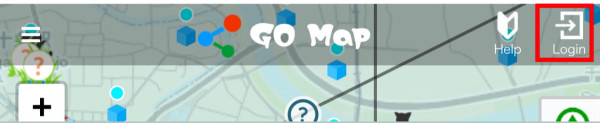
If You Are Not Registered on GO Raids
If you have not registered, please check the following three points. There may be a chance to recover your previous ID (guest ID).
① Check for Private/Incognito Mode
When browsing the site, you may be accessing it with your browser information reset. In Google Chrome, this is called “Incognito Mode”; in Safari, it’s called “Private Mode”.
How to Check
Below is an example for Safari, but in Chrome, the window will also appear grey.
Note that once you enable Private Mode in Safari, all new tabs may open in Private Mode by default.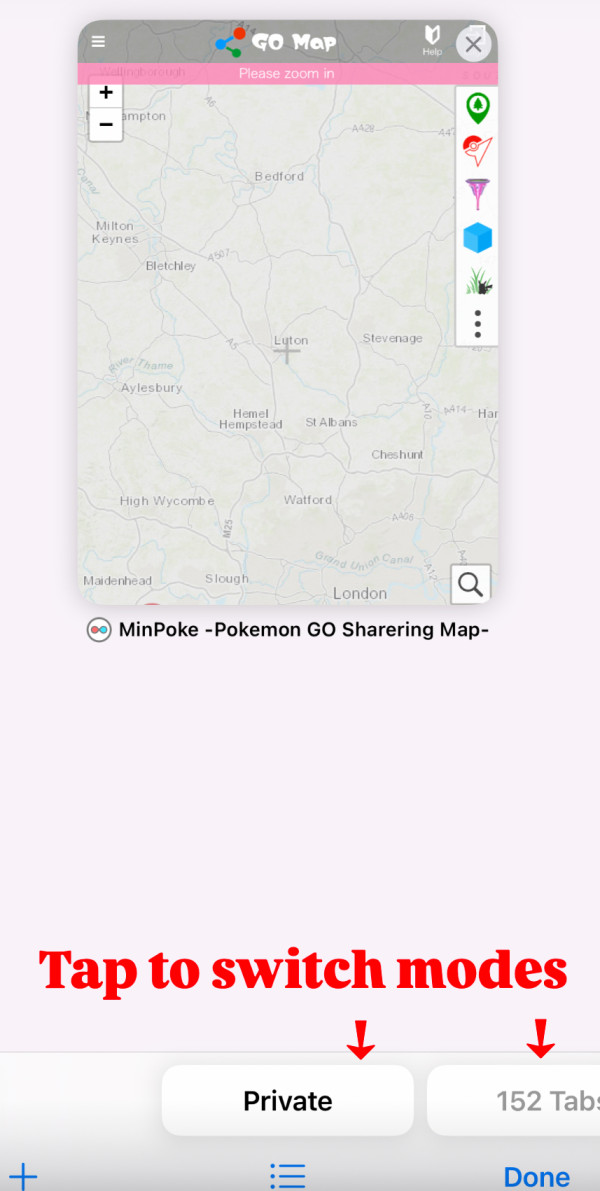
② Check Your Device
- Have you changed your device?
- Have you changed your browser?
- Have you changed the logged-in user on your device?
- Are you using a shared computer?
③ Check Your Login Status
Double-check if you may have registered a user account in the past.
If you can identify your old GO Raids ID, you may still be able to log in.
If you still cannot recover your ID after trying the above steps, please understand that we are unable to restore it on our end.
How to Register
For details on user registration, please see this article:


 9D
9D