

Raid Finder

27746Viewing: 25
JoinInvite

1. Setting Trainer Information (First Time Only)

Tap the settings button at the top of the screen and enter your Trainer Name, Trainer Code, and Trainer Level as shown in the Pokémon GO app.
This information is required for posting or joining an invitation, so please enter it accurately.

2. Selecting a Boss

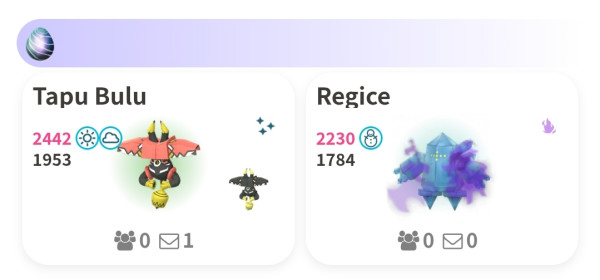
Select the boss you want to join from the Boss List or the Invitation List.
3. Starting Auto-Matching

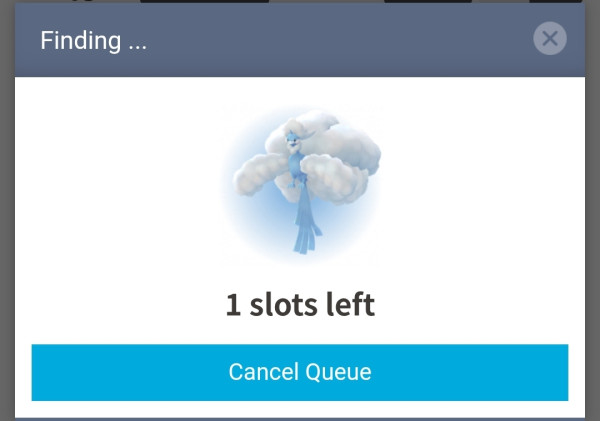
Set the conditions for the invitation you’d like to match with, then start auto-matching.
You may close this screen until you're close to being matched.
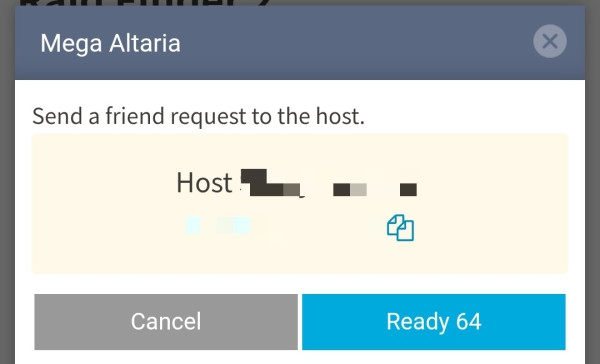
4. Sending a Friend Request to the Host

When a match is found, the host’s Trainer Code will be displayed.
Send a friend request and mark yourself as ready within 90 seconds.
5. Waiting Until All Members Are Ready

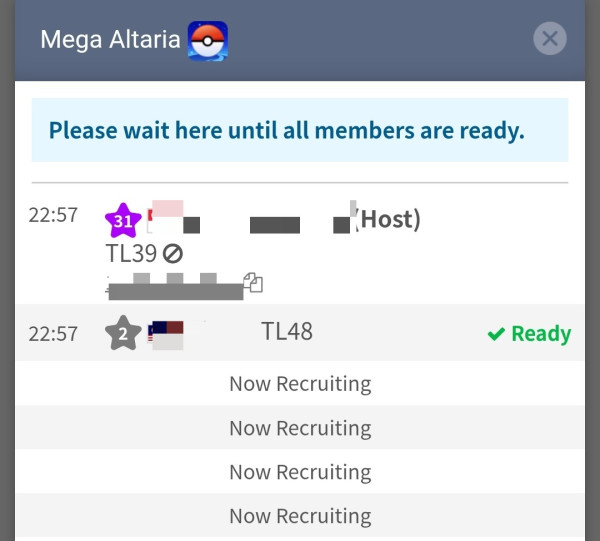
Once you’re marked as ready, the member list will be displayed.
6. Joining the Raid

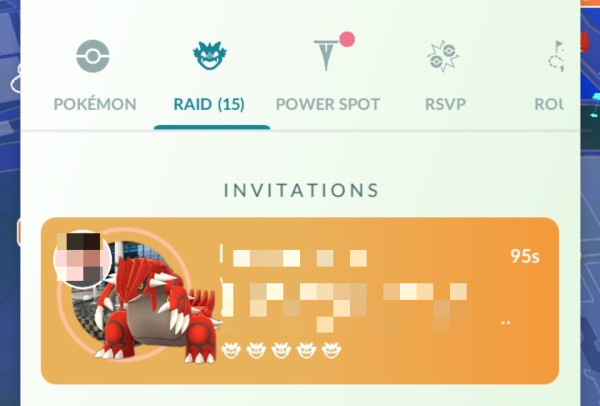
When all members are ready and the host’s status changes to “Ready,” the host will send out raid invitations.
Use a Remote Raid Pass to join the raid.
7. Rating the Host

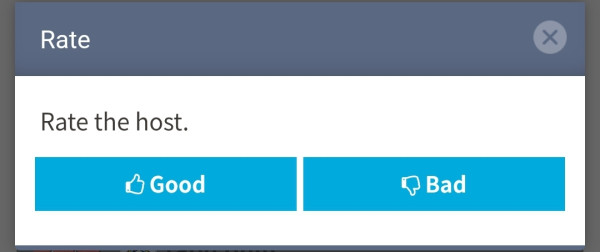
After the raid ends, please rate the host.
The rating screen will appear after you close the member list.
Notes

  • If you enter the lobby but leave before the raid starts, your pass will not be consumed.
  • After the raid, remove the host from your friend list so you can send another friend request later.
  • Invitations from Pokebattler (flag with a sword icon) are not eligible for auto-matching. You can only join these from the Invitation List.
  • If an invitation is deleted immediately after auto-matching, you do not need to start over. You will automatically resume matching when you select the boss again.
  • Even if you leave the lobby, you can re-enter the same one as long as not all members have left and the room is not full.

1. Check Friend Count

Make sure your friend count has not reached the [marker:450-person limit} so that participants can send friend requests.

2. Setting Trainer Information (First Time Only)

Tap the settings button at the top of the screen and enter your Trainer Name, Trainer Code, and Trainer Level as shown in the Pokémon GO app. This information is required for creating or joining an invitation, so please enter it accurately.

3. Selecting a Boss

Select the boss you want to invite from the Boss List.

4. Inviting the Boss

Enter the conditions and create the invitation.
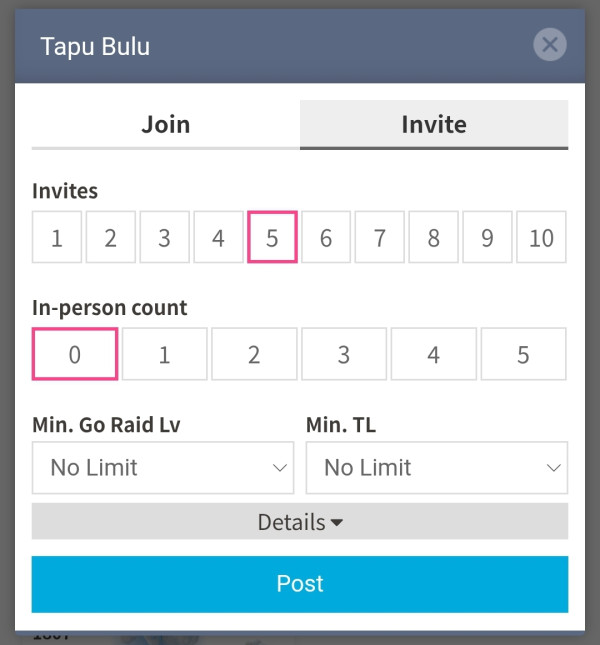
5. Approving Friend Requests

Once you create the invitation, auto-matching will begin and members will be added automatically.
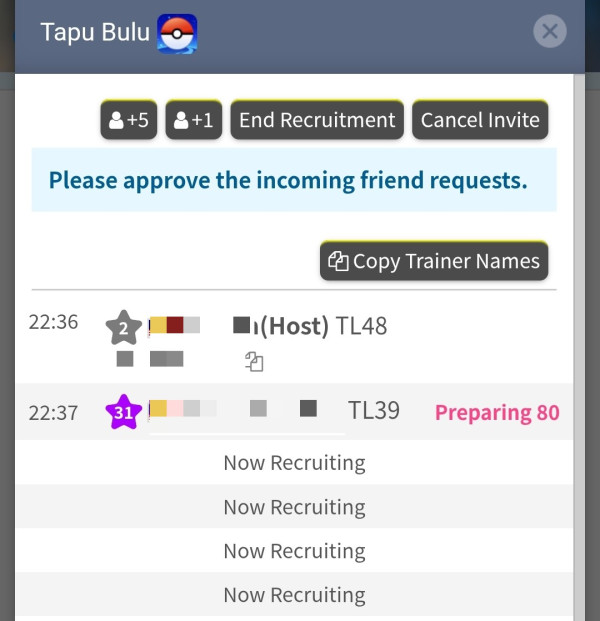
ButtonPurpose
+1Increase the number of participants by 1
+5Increase the number of participants by 5
End RecruitmentStop recruitment early
Cancel InvitationCancel the invitation
Copy Trainer NamesCopy the Trainer Names of all members(Search for Raid Invites)
Canceled Trainers are not included.

Approve all incoming friend requests.

6. Filling the Roster

Recruitment will end automatically once the capacity is reached.
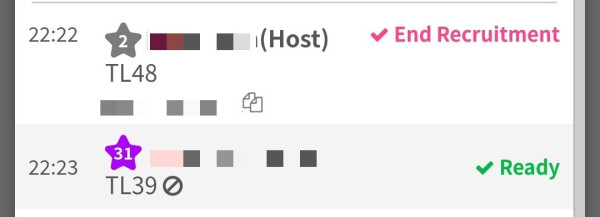
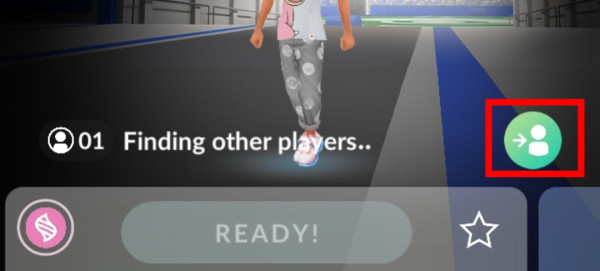
7. Entering the Raid and Sending Invites

Join the raid and send member invitations.
Raid TypeInvite Capacity
Normal Raid10 people (5 at a time)
Shadow Raid10 people (5 at a time)
Max Battle3 people
Gmax Battle20 people (10 at a time)

※ About 35 seconds after sending an invitation, the invite button becomes available again.

Notes

  • If the lobby fills up before you send invites, you won’t be able to invite anyone. For busy gyms, create a private group using a group code.**

If You Find a Fraudulent User

If you find a fraudulent host or participant, select after the Trainer Name in the participant list to report them.
Users with multiple infractions will have their ability to join or invite restricted, and users whose Trainer information is likely incorrect will be notified accordingly.
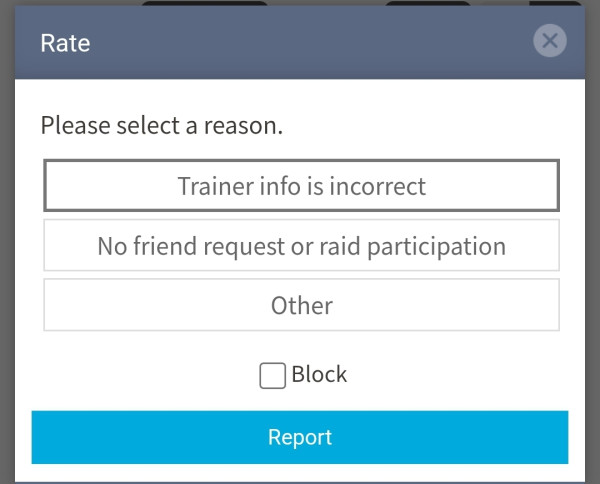
By selecting “Block” when reporting, you will no longer be matched with that user in auto-matching.

Comments (27746)

When posting, please comply with our Terms & Conditions. .
Nickname
*Trip Key Available
Comments
Reload
  • No.27405 KadenC0819/IXiCgEg Dec 18, 2025
    5
    Who Haves a shiny snorlax
    replies (2) Dec 20, 2025
    • No.27406 EldRloM Dec 18, 2025
      1
      I have shiny munchlax
    • No.27416 EHFQAFc Dec 20, 2025
      0
      I have one hren030510
    Reply
  • No.27399 d0k5eFA Dec 16, 2025
    1
    602777952909 My friend code if anyone would like to add me
    replies (1) Dec 20, 2025
    • No.27415 M4r5h4/EhBHUQI Dec 20, 2025
      0
      Hi Jj hugz love you
    Reply
  • No.27412 @Jemel Dec 19, 2025
    3
    👀👀👀
    replies (1) Dec 20, 2025
    • No.27414 QgQUByA Dec 20, 2025
      0
      Cap
    Reply
  • No.27404 KadenC0819/IXiCgEg Dec 18, 2025
    3
    Does Anybody have a shiny snorlax regular pokemon to trade for. I can trade you my Shiny Garolian Zapdos Legendary To Trade that Shiny Snorlax in pokemon go
    replies (2) Dec 19, 2025
    • No.27408 MFWZZRA Dec 18, 2025
      0
      TrainerHen006 here, would a g max one work, too? And can you spoof?
    • No.27409 IDIXU0Q Dec 19, 2025
      0
      I’ll trade you a shiny snorlax I have both regular shiny and g max shiny
    Reply
  • No.27360 RaidFinder77/MFAQeDA Dec 14, 2025
    1
    Looking for gmax Snorlax for the next 1-2 hours(about 14raids left)
    689147107219

    Ty in advance!!
    replies (2) Dec 18, 2025
    • No.27386 M4r5h4/EhBHUQI Dec 16, 2025
      1
      I hear ya that pisses my off too
    • No.27407 Gwenn/aBhjiWA Dec 18, 2025
      0
      Same here
    Reply
  • No.27402 GregoTheOx/@GregoT0x Dec 17, 2025
    0
    I've lost the original gym for the mounted raid, I'm going to another one. 10 minutes
  • No.27384 Cosmiccorvine/IVBJhlg Dec 16, 2025
    4
    995579603283

    I need to add a new friend someone add me please
    replies (2) Dec 16, 2025
    • No.27387 M4r5h4/EhBHUQI Dec 16, 2025
      0
      Sent
    • No.27400 Tinyfitz/M0RHEDI Dec 16, 2025
      0
      Add me 222039165246 I have the same challenge
    Reply
  • No.27398 Blancaana21/MYcGJnE Dec 16, 2025
    1
    Need new friends 531567645413
  • No.27396 M4r5h4/EhBHUQI Dec 16, 2025
    1
    857163270676
    Need new friends ? I’ve replied to 4 players now that has not answered or accepted my friend reply . Have a great day
  • No.27389 xvRicky/QDVASRU Dec 16, 2025
    2
    Need new friends
    220977870705
    replies (2) Dec 16, 2025
    • No.27393 M4r5h4/EhBHUQI Dec 16, 2025
      0
      Sent
    • No.27395 M4r5h4/EhBHUQI Dec 16, 2025
      0
      Sent
    Reply
  • No.27355 E5EDFIY Dec 14, 2025
    3
    419699788924
    Looking to fill my friends list with active players, im usually casual
    replies (4) Dec 16, 2025
    • No.27381 M4r5h4/EhBHUQI Dec 16, 2025
      0
      Sending
    • No.27382 M4r5h4/EhBHUQI Dec 16, 2025
      0
      Sent
    • No.27383 M4r5h4/EhBHUQI Dec 16, 2025
      0
      Hopefully you will reply
    • No.27394 M4r5h4/EhBHUQI Dec 16, 2025
      0
      Sent ) hours ago waiting for you to accept
    Reply
  • No.27390 @Jemel Dec 16, 2025
    4
    👀👀👀
    replies (2) Dec 16, 2025
    • No.27391 HEHE123/MxIpJQM Dec 16, 2025
      1
      Its a very nice shiny doggy, congratz.
    • No.27392 @Jemel Dec 16, 2025
      1
      Thank you brother
    Reply
  • No.27356 MHYxMpY Dec 14, 2025
    8
    4 of us, even 3 can defeat reshiram. STOP LEAVING AT 5 SECONDS LEFT
    replies (2) Dec 16, 2025
    • No.27359 ExFXhGA Dec 14, 2025
      0
      That’s super annoying
    • No.27388 M4r5h4/EhBHUQI Dec 16, 2025
      0
      Pisses me off too it’s like they way the pokemon but they don’t wanna fight for it they want the others left in the team to take it down so they can’t come back in at the last minute and collect it
    Reply
  • No.27372 @Jemel Dec 15, 2025
    3
    👀👀👀
    replies (4) Dec 16, 2025
    • No.27377 EliteShinyHunter/M2F3hSE Dec 15, 2025
      0
      Hate to tell you but your phone says your GPS cannot be found
    • No.27378 IwcAEnM Dec 15, 2025
      1
      He is a spoofer
    • No.27380 EliteShinyHunter/M2F3hSE Dec 16, 2025
      0
      I know I poke fun at people at obvious things
    • No.27385 M4r5h4/EhBHUQI Dec 16, 2025
      0
      Nice I’ve come very close
    Reply
  • No.27375 @Zig1581 Dec 15, 2025
    1
    How do I host a raid?
    replies (1) Dec 15, 2025
    • No.27376 EliteShinyHunter/M2F3hSE Dec 15, 2025
      0
      You would tap on the Pokemon you would want to host and a little thing with two options should pop up. One should be “Join” and the other should be “invite”. Tap the one that says “invite” and select how many people you want to have join and there might be some other stuff there like “weather, remove friend after raid, send gifts, and trainer level,” but you can just ignore that
    Reply
Menu
Top

Talk User settings Sign out